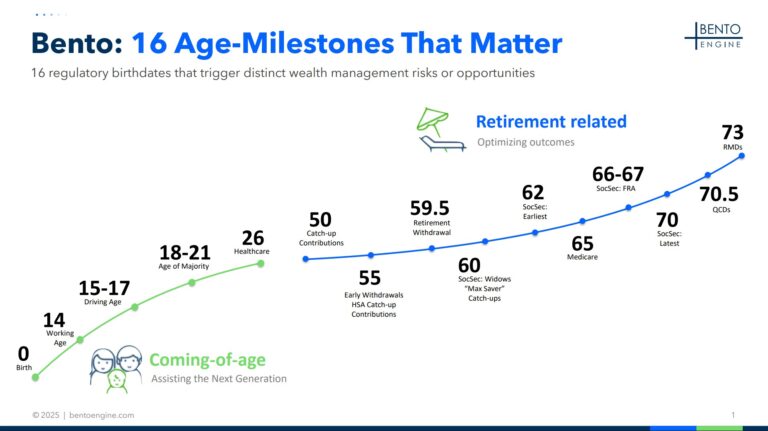
The Bulk Alert Generator scans your entire book against any of the 16 age-milestones, allowing you to quickly identify all contacts who have experienced or will experience a specific event within any timeframe you choose.
Available now in the Bento Admin Portal (for Bento clients).
— THE PROBLEM
The Milestones Are Predictable. But Running
Targeted Campaigns is Hard.
01
Bento already helps you identify upcoming advice opportunities in your CRM, one contact at a time. You value the client-specific advice engagement Bento supports …
02
… but you also want to run even more efficient campaigns on certain topics. You are looking for a way to serve all of your relevant contacts on a certain topic at once.
— SEE IT IN ACTION
From milestone to mailing list in three clicks
A quick walkthrough of building a bulk alert campaign — from selecting an age-milestone to exporting the finished contact list.
— HOW IT WORKS
Three steps. Any milestone. Any
timeframe.
01
Select a Moment That Matters
Choose from all 16 age-milestones — e.g. Age 50, Catch-up Contributions, or Age 70.5, QCDs.
16 milestones available
02
Define your timeframe
Look back or look forward across any date range — for example, 1/1/27 through 12/31/27.
Look-back or look-forward
03
Choose how you receive it
Export a CSV, or push individual alerts directly into your CRM — whichever fits your workflow.
CSV or CRM alerts
— INSIDE THE PORTAL
The Bulk Alerts tab
A look at the actual Bulk Alerts tab inside the Admin Portal.
— USE CASES
Built for look-back and look-forward
campaigns
Look-back
Run a QCD campaign, retroactively
Identify everyone who’s already turned 70.5 year-to-date, and reach them while a QCD is still relevant for this tax year.
Example: Everyone who turned 70.5 YTD → look-back campaign on Qualified Charitable Distributions.
Look-forward
Get ahead of catch-up contributions
Identify clients turning 50 next year for a proactive Catch-up Contributions campaign — or ages 60–63 for a “Max Saver” push.
Example: Everyone turning 50 next year → look-forward campaign on Catch-up Contributions.
Look-back
Run a QCD campaign, retroactively
Identify everyone who’s already turned 70.5 year-to-date, and reach them while a QCD is still relevant for this tax year.
Example: Everyone who turned 70.5 YTD → look-back campaign on Qualified Charitable Distributions.
Look-forward
Get ahead of catch-up contributions
Identify clients turning 50 next year for a proactive Catch-up Contributions campaign — or ages 60–63 for a “Max Saver” push.
Example: Everyone turning 50 next year → look-forward campaign on Catch-up Contributions.
— GET STARTED
Get Going with Bulk Alerts Now
3 steps to sign up for and use the Bulk Alert Generator (free for current Bento clients)
01
Fill Out The Form
Enter your name, email, and company, then click Submit.
02
Set Up Your Account In The Bento Admin Portal
Check your email for an invite from Bento Engine, then click Open Bento Admin Portal and enter your email, first name, and last name.
03
Go To The Bulk Alerts Tab
Once you’re logged in to the Bento Admin Portal, navigate to the Bulk Alerts tab in the main menu — that’s where you’ll select a milestone, set a timeframe, and choose the delivery format.
— READY WHEN YOU ARE
Your next campaign is already in your book of business.
We use cookies to ensure that we give you the best experience on our website. If you continue to use this site we will assume that you are happy with it.
 Skip to content